WhatsApp Chat Backup to PC Without Cloud Storage
If you want a WhatsApp chat backup on a PC or Mac that you can actually open, search and export, you need more than a restore-only cloud backup. A practical local workflow saves the messages and supported media that are currently available, organizes them on your computer, and creates readable formats such as HTML or structured files such as Excel and CSV.
Bakvio is built for that local archive workflow. It stores completed backups on your computer so you can review conversations, search records and export the data you already saved. It does not recover messages that were never backed up, and it does not restore an archive back into WhatsApp.
Quick answer: Install Bakvio on Windows or macOS, connect a WhatsApp account you control, select chats, contacts or group members, and save the available data to the local Backup Center. You can then search the backup and export supported records to HTML, Excel or CSV without making cloud storage part of the core workflow.
What “WhatsApp backup” can mean
People use the word backup for several different tasks. Choosing the wrong method often produces a file that cannot do what you expected.
1. Cloud or device backup for restoration
WhatsApp can create backups designed to restore chats when you reinstall the app or move to another supported device. Android commonly uses Google Drive alongside local device files, while iPhone commonly uses iCloud. WhatsApp also offers optional end-to-end encrypted backups; Meta explains that the password or encryption key is not available to WhatsApp or the storage provider when this option is enabled.
This type of backup is useful when your goal is to restore WhatsApp. It is generally not intended to be browsed like a folder of readable conversations on a computer.
2. Native chat export
WhatsApp’s built-in export feature creates a portable copy of one conversation. It is helpful for occasional sharing or archiving, but repeating the process across many chats can become slow. The resulting text-and-media package is also different from a continuously searchable backup center.
3. Phone-to-phone chat transfer
Chat transfer is a migration workflow. It moves supported history from an old phone to a new phone. It does not automatically give a business an independent, readable archive for record keeping, employee handover or offline review.
4. Readable local archive
A readable local archive is designed for access outside WhatsApp. Instead of existing only as a restore package, it lets you browse previously saved conversations, filter records and export them into useful formats. This is the problem Bakvio addresses.
The practical difference is simple: restoration puts data back into WhatsApp, while export and local archiving make selected records usable outside the app.
Compare WhatsApp backup options
| Method | Primary purpose | Read on a PC | Search across saved records | Restore into WhatsApp | Storage control |
|---|---|---|---|---|---|
| Google Drive or iCloud backup | Restore chats | Usually no | No | Yes, when requirements are met | Managed through the cloud account |
| Android local backup files | Restore chats on Android | Not normally human-readable | No | Sometimes, with the correct setup | Stored on the phone until copied |
| WhatsApp native export | Save one readable conversation | Yes | One export at a time | No | You choose where to save or share it |
| Phone-to-phone transfer | Move chats to another phone | No | No | Transfers into WhatsApp | Temporary migration workflow |
| Bakvio local backup | Searchable computer archive and export | Yes | Yes | No | Completed backups remain on your computer |
No single option is best for every purpose. If you need disaster recovery inside WhatsApp, keep an official restore backup. If you also need readable business records, add a local archive. These two workflows can complement each other.
Download Bakvio for Windows or macOS to create a searchable local archive of chats, contacts and group-member records.
Why back up WhatsApp chats to a computer?
Keep business conversations available
Sales, support and supplier conversations often contain decisions that are not recorded anywhere else. A local copy helps a team retain the history that has already been backed up when a phone is replaced, an employee leaves or an account becomes unavailable.
Read the archive without restoring a phone
A restore backup is valuable only when you can complete the restore process. A readable HTML archive or Bakvio conversation view can be opened for reference without reinstalling WhatsApp on another phone.
Find a specific message faster
Businesses rarely need to read an entire chat from the beginning. They need an invoice discussion, a customer number, a date or a delivery instruction. Bakvio supports searching and filtering previously backed-up data by available fields such as keyword, account, contact and date.
Preserve media context
Photos, videos, audio, documents and other supported attachments may be as important as the message text. A useful backup plan checks that the required media is available at the time of backup and verifies the exported files afterward.
Keep control of storage
Local storage means the primary Bakvio backup remains on the computer running the client. You decide how that computer, its disk and any exported files are protected. Local does not automatically mean secure: device encryption, access controls and a second protected copy still matter.
How to create a local WhatsApp chat backup with Bakvio
The interface and workflow below were reviewed on 08/05/2026. Labels may change as the client is updated, but the backup principles remain the same.
Step 1: Prepare the computer
Use a supported Windows or macOS computer with enough free disk space for the chats and media you intend to save. For business records, sign in with an operating-system account that is not shared casually with other users.
Before starting:
- Confirm that the computer has a stable connection.
- Make sure the WhatsApp account and conversations are accessible.
- Decide which chats, contacts and groups are in scope.
- Check that you are authorized to retain the selected business data.
- Choose a protected storage location for later exports.
Step 2: Install and connect Bakvio
Download Bakvio, install the desktop client and connect the WhatsApp account you control. Bakvio can only save data that is available during the backup process. If a message or media file is already unavailable, the client cannot recreate it.
Step 3: Select the backup type
Bakvio separates records into three practical areas:
- Chat Backup for messages, timestamps and supported media.
- Contact Backup for saved and unsaved numbers associated with the connected account.
- Group Member Backup for available group, member, nickname and admin fields.
Start with the records that would be hardest to reconstruct after an access problem. For many businesses, that means active customer conversations and the contacts behind them.
Step 4: Let the local backup complete
Keep the account connected while the selected data is being saved. Do not treat a “started” job as a completed backup. Check the local Backup Center and confirm that the expected conversations and record counts are present.
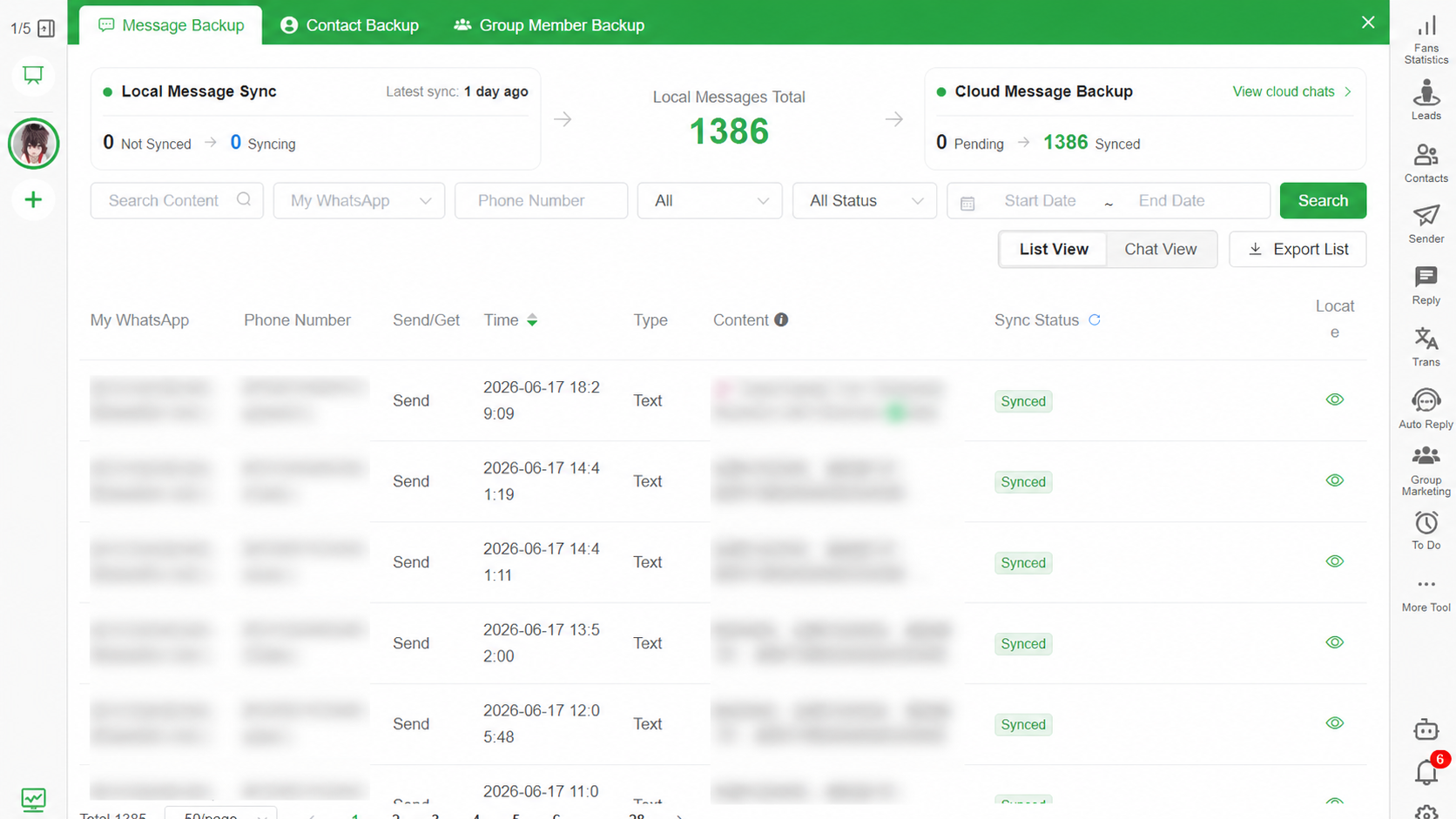
Step 5: Search and inspect the result
Open several important chats and verify:
- Recent messages appear in the correct conversation.
- Sender, time and message direction are understandable.
- Required media opens where supported.
- Saved and unsaved contacts are identifiable.
- Group-member fields match the selected groups.
This verification step is essential. A backup that has never been checked is only an assumption.
Step 6: Export the records you need
Choose the export format based on the next task:
- HTML for a readable conversation layout that opens in a browser.
- Excel or CSV for filtering, analysis, approved CRM preparation or structured archiving.
- Media files for preserving supported images, videos, audio and documents alongside the message context.
Learn the detailed HTML workflow in How to Export WhatsApp Chats to HTML with Media.
Windows, macOS, Android and iPhone: what changes?
Windows and macOS
Bakvio runs as a desktop backup client on supported Windows and macOS computers. The computer is where you search, view and export completed local records.
Android
Android can maintain WhatsApp restore files on the phone and can use Google Drive for cloud restoration. Copying encrypted database files to a PC is not the same as creating a readable archive. Keep the official restore backup if you need to restore WhatsApp, and use Bakvio when you also need searchable computer access.
iPhone
iPhone commonly relies on iCloud or an encrypted computer device backup for restoration. Those workflows protect device recovery but are not equivalent to selecting business chats and exporting readable HTML or structured tables.
The key question is not simply “Where is the backup?” It is “What do I need to do with the data later?” Restoration, reading, searching and exporting are separate requirements.
What can a useful local backup include?
Availability depends on what the connected account and client can access when the backup is created. A Bakvio archive can cover:
- Message text and conversation context.
- Message timestamps and direction.
- Supported photos, videos, audio and documents.
- Saved and unsaved contact numbers.
- Contact names and account association where available.
- Group names, member numbers, nicknames and admin status.
- Available join, leave or removal information.
Do not promise that every historical media file will exist. WhatsApp may no longer make older attachments available, a device may have removed them, or the connection may end before they are saved. Verify the output that matters to you.
HTML, Excel, CSV or media: which format should you choose?
Choose HTML for reading
HTML is the clearest option when people need to follow a conversation. It preserves a readable thread and can be opened with a normal browser. It is useful for handovers, customer-support review and long-term reference.
Choose Excel or CSV for structured work
Spreadsheets are better for filtering many rows, checking dates, preparing authorized contact records or importing approved data into another business system. They are less suitable for reading a long conversation naturally.
Save media when the attachment is part of the record
A message saying “approved” may be meaningless without the related image, quotation or document. Include supported media when context matters, and keep the exported folder structure intact.
How to verify that your backup remains local
Privacy claims should be specific and testable. Use this checklist:
- Confirm where Bakvio stores completed backup data on the computer.
- Review a chat in the Backup Center after the backup finishes.
- Export a small test conversation and locate the files on disk.
- Disconnect from the internet and confirm that the already-saved export opens locally.
- Check the product privacy information and operating-system network controls.
- Protect the computer with disk encryption, a strong login and current security updates.
- Restrict access to exported HTML, spreadsheets and media folders.
- If you create a second copy, use encrypted storage that your organization controls.
“Stored locally” describes where Bakvio keeps the core completed backup. It does not prevent a user, another program or an administrator from copying an exported file elsewhere. Your operating practices remain part of privacy protection.
What a Bakvio backup cannot do
Clear boundaries make a backup plan more reliable:
- It cannot retrieve a message or attachment that was never successfully backed up.
- It cannot continue collecting new data after the account is no longer accessible.
- It does not restore exported HTML, Excel or CSV files into WhatsApp.
- It does not guarantee that every old media file is still available.
- It does not make a file automatically compliant with every legal or regulatory requirement.
- It does not replace permission, retention and access-control policies.
If account access is later lost, data already saved locally can still be reviewed and exported. New or previously unavailable data cannot be recovered by Bakvio.
Build a safer business backup routine
The best schedule depends on how quickly conversations change. A support team with daily customer activity needs a different routine from a consultant who uses WhatsApp occasionally.
Use a simple operational cycle:
- Define which accounts and chats are business-critical.
- Assign an owner for each backup.
- Back up at a frequency that matches the acceptable data-loss window.
- Verify representative chats, contacts and media after each important run.
- Export milestone records when a project, dispute or employee handover requires them.
- Review who can access the computer and export folders.
- Test whether another authorized team member can find a required record.
For a ready-to-use process, see the WhatsApp Chat Backup Checklist for Small Businesses.
Frequently asked questions
Can I back up WhatsApp chats to my PC without Google Drive?
Yes. Bakvio’s core workflow saves completed chat, contact and group records locally on a supported Windows or macOS computer. Google Drive is not required for this local archive. You may still keep an official WhatsApp restore backup separately.
Can I view a WhatsApp backup on my computer?
Official restore backups are not normally designed for direct browsing. With Bakvio, you can view data already saved in the local Backup Center and export conversations to readable HTML. See How to View and Search a WhatsApp Backup on PC.
Does a local WhatsApp backup include photos and videos?
Bakvio can save supported media that is accessible during backup, including photos, videos, audio and documents. Verify important attachments after the process because unavailable media cannot be recreated.
Can I restore a Bakvio backup into WhatsApp?
No. Bakvio creates a searchable local archive and exportable records; it is not a WhatsApp restoration tool. Use WhatsApp’s supported backup or transfer process when your goal is to restore chats into the app.
Can I read the backup after losing account access?
You can continue viewing and exporting data that was successfully saved locally before access was lost. Bakvio cannot fetch messages or media that were not already backed up.
Where is my Bakvio backup stored?
The core completed backup is stored on the computer running Bakvio. Exported files are saved to the location you choose. Protect both with appropriate device and folder access controls.
Is local storage automatically more secure than cloud storage?
No storage method is automatically secure. Local storage gives you direct control and reduces dependence on a cloud restore workflow, but you still need disk encryption, strong access controls, updates and a protected second copy for important records.
Continue with a focused backup guide
- Compare restoration and readable records in WhatsApp Backup vs Export.
- Decide between recovery and retrieval in Local WhatsApp Backup vs Google Drive and iCloud.
- Prepare an authorized staff transition with Back Up WhatsApp Business Chats Before an Employee Leaves.
- Preserve managed communities with Back Up and Export WhatsApp Group Members.
Start a local, searchable WhatsApp chat backup
A useful backup should match the job you expect it to perform. Keep an official restore backup for device recovery, and create a readable local archive when your business needs to search, review or export conversations independently.
Download Bakvio to back up accessible chats, media, contacts and group-member records on your Windows or macOS computer.
WhatsApp Backup vs Export: What Is the Difference?
A practical comparison of restore backups, native chat export, phone transfer and searchable local archives.
How to View and Search a WhatsApp Backup on PC
Understand the difference between restore files and readable archives, then learn how to find messages, contacts and media in a local computer backup.